AI Video Generator
 AI Image to Video
 AI Text to Video
 AI Image Generator
 AI Image to Image
 AI Text to Image
 AI Video Generator
 AI Image Effects

 Bring your imagination to life with powerful Viyou AI tools.
Tired of your videos looking like everyone else's? Struggling to find the perfect image that matches the epic scene in your head? You're not alone. Every creator hits that wall—the gap between a brilliant idea and the bland reality of stock libraries. That friction ends now. Viyou AI's built-in AI Image Generator is your secret weapon to bridge that gap. Create one-of-a-kind, pro-level visuals in seconds, right inside your editing timeline, and make your videos truly unforgettable.
Why Your Edit Needs a Built-In Image Generator
Let's be real: the old way is a creativity killer. Bouncing between a separate AI art website, a design app, and your video editor is a mess. You waste time exporting, resizing, and trying to make styles match. Viyou AI cuts the chaos by baking a powerful image generator directly into its cloud studio. Think of a visual, generate it on the spot, and drop it into your sequence—all without breaking your flow. It’s about keeping you in the creative zone, making it stupidly easy to maintain a consistent, custom look from start to finish.
What Can You Actually Do With It?
1. Text to Image: Describe It, Get It.
This is where the magic starts. Type what you see in your mind. The more descriptive, the better. Prompt like “a cinematic shot of a neon-lit alley in a cyberpunk city, rainy, reflective pavement” or “a clean product mockup of a white smartwatch on a marble surface, studio lighting.” Watch as the AI brings your words to life.
2. Image to Image: Remix & Reimagine.
Got a rough sketch, a mood board image, or a basic product photo? Upload it and tell the AI how to transform it. Change the art style (“make it look like a vintage poster”), add elements (“put this product on a beach at sunset”), or simply enhance it. It’s your creative springboard.
3. AI Image Effects: Style It in One Click.
Found a great base image but want to take it to the next level? Viyou AI's Fun AI Image Effects are made for creative and stunning visual storytelling. Go beyond basic filters. With just one click, you can apply powerful AI-driven artistic transformations that radically alter the style and feel of any photo. It's the fastest way to add serious, professional visual flair to your projects without any complicated editing.
Your Quick-Start Guide to Creating AI Images
Step 1: Fire Up the Tool Inside Your Project
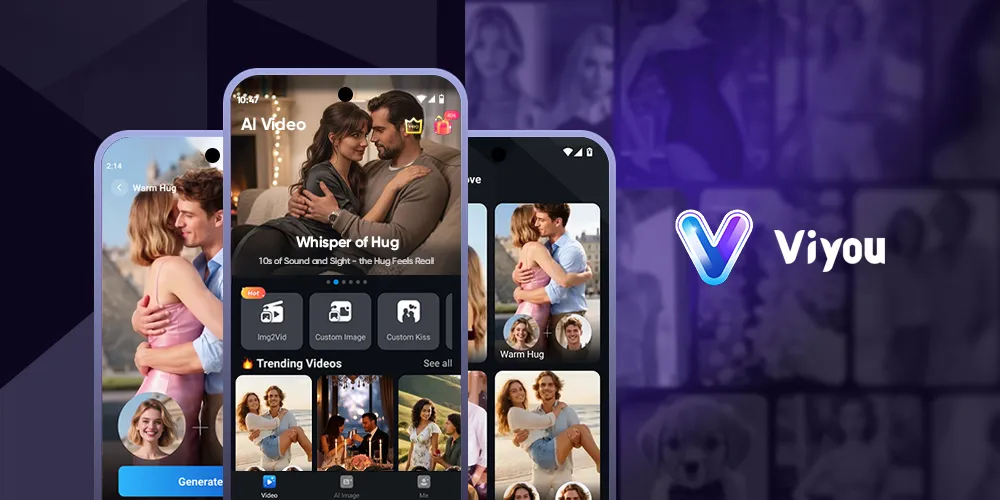
Log into your Viyou AI dashboard. Look for the “AI Image” button. The generator pops up right alongside your timeline, so your project context is never lost.
Step 2: Pick Your Mode and Command the AI
Choose your path:
- Text to Image: In the prompt box, describe your scene in detail. Pro tip: Use descriptive keywords about style, lighting, and composition. Example: “A majestic glowing fox made of circuits walking through a bamboo forest, cyberpunk meets ancient China, dramatic lighting, 4K.”
- Image to Image: Upload your starting image and then instruct the AI on what to change.
- AI image effects: Choose an AI image effect you like and upload your picture.
Step 3: Generate
Click the “Create” button, and your images will be ready in moments. You can download your favorites right away or generate new batches until you find the perfect match. The results are crystal-clear, ready-to-use, and brimming with detail—giving you unlimited creative potential without any technical hassle.
Stop Searching. Start Creating.
Viyou AI's AI Image Generator isn't just another feature; it's a full-on creative power-up. It solves the real problem: your unique vision shouldn't be limited by generic assets. This tool puts original, compelling visuals at your fingertips, ensuring your content stands out in a crowded feed.
Ready to make videos that look as good as your ideas? Head to Viyou AI and try the AI Image Generator for free. Your next iconic visual is just a prompt away.