AI Video Generator
 AI Image to Video
 AI Text to Video
 AI Image Generator
 AI Image to Image
 AI Text to Image
 AI Video Generator
 AI Image Effects

 Bring your imagination to life with powerful Viyou AI tools.
As an official editor at Viyou AI, I recently spent several days testing the Wan 2.6 Reference to Video feature directly on the Wan 2.6 official website. Using the platform’s free generation opportunities, I focused exclusively on what many creators care about most: video‑to‑video generation.
This article documents my real usage experience with wan2.6 free, explains how wan2.6 video to video works in practice, and evaluates whether Wan 2.6 truly deserves its reputation as a next‑generation wan2.6 ai video generator.

What Is Wan 2.6 Reference to Video?
Before diving into the experiment, it’s important to clarify what wan2.6 reference video actually means.
Unlike traditional AI tools that simply apply filters or re‑render frames, Reference to Video allows Wan 2.6 to treat an uploaded video as a structural blueprint. The model analyzes:
- Motion paths and object trajectories
- Camera movement and shot rhythm
- Temporal continuity between frames
Based on this understanding, Wan 2.6 generates a new video that follows the same underlying structure while introducing new visual elements defined by the prompt.
This is the technical foundation behind wan2.6 video to video — and the core feature I tested.
Why I Chose Video‑to‑Video for This Test
Among text‑to‑video, image‑to‑video, and video‑to‑video, the last one is by far the most demanding. If an AI model fails here, it usually means:
- Motion breaks between frames
- Inconsistent object scale or position
- Flickering or unstable results
That’s why wan2.6 video to video is the best benchmark for judging a true wan2.6 ai video generator.
Wan 2.6 offers free attempts, making it possible to conduct a meaningful hands‑on test even without a paid plan — a strong signal for anyone searching for wan2.6 free ai video tools.
Test Setup: Two Reference Videos
For this experiment, I prepared two original horizontal videos, both short and clean, to maximize signal clarity.
Reference Video 1: Viyou Clouds on Earth
This video shows stylized Viyou‑branded clouds floating above the Earth’s surface, with slow camera movement and stable lighting.
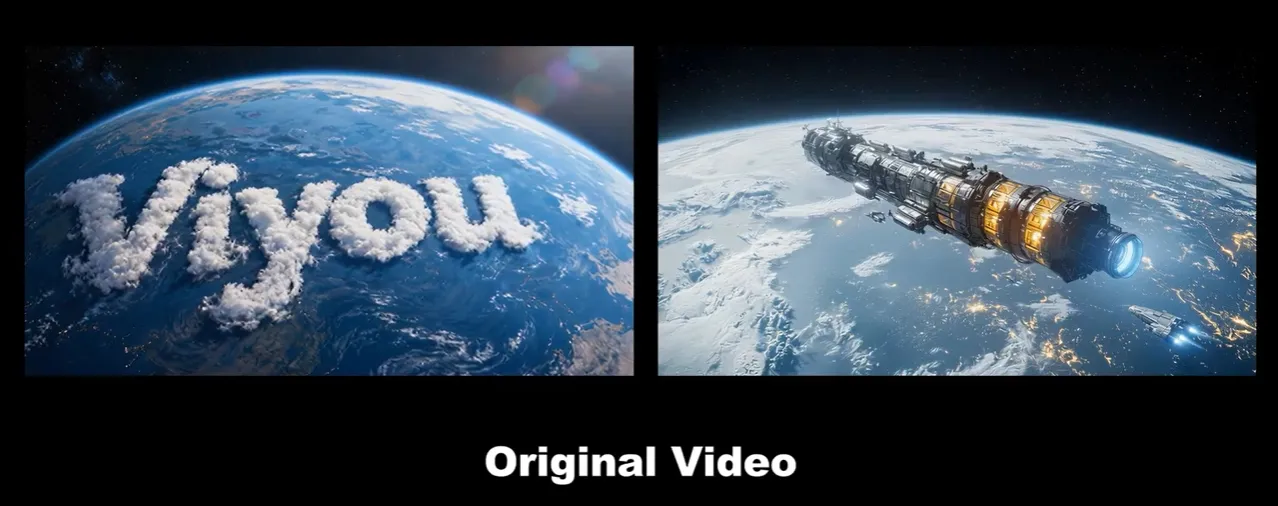
Reference Video 2: A Spaceship Landing on Earth
The second video features a spaceship descending toward the Earth, with clear downward motion and a defined landing trajectory.
These two clips share similar pacing and perspective, making them ideal candidates for wan2.6 reference video fusion.
The Prompt Used for Video‑to‑Video Generation
After uploading both videos into Wan 2.6, I used the following prompt to guide the generation:
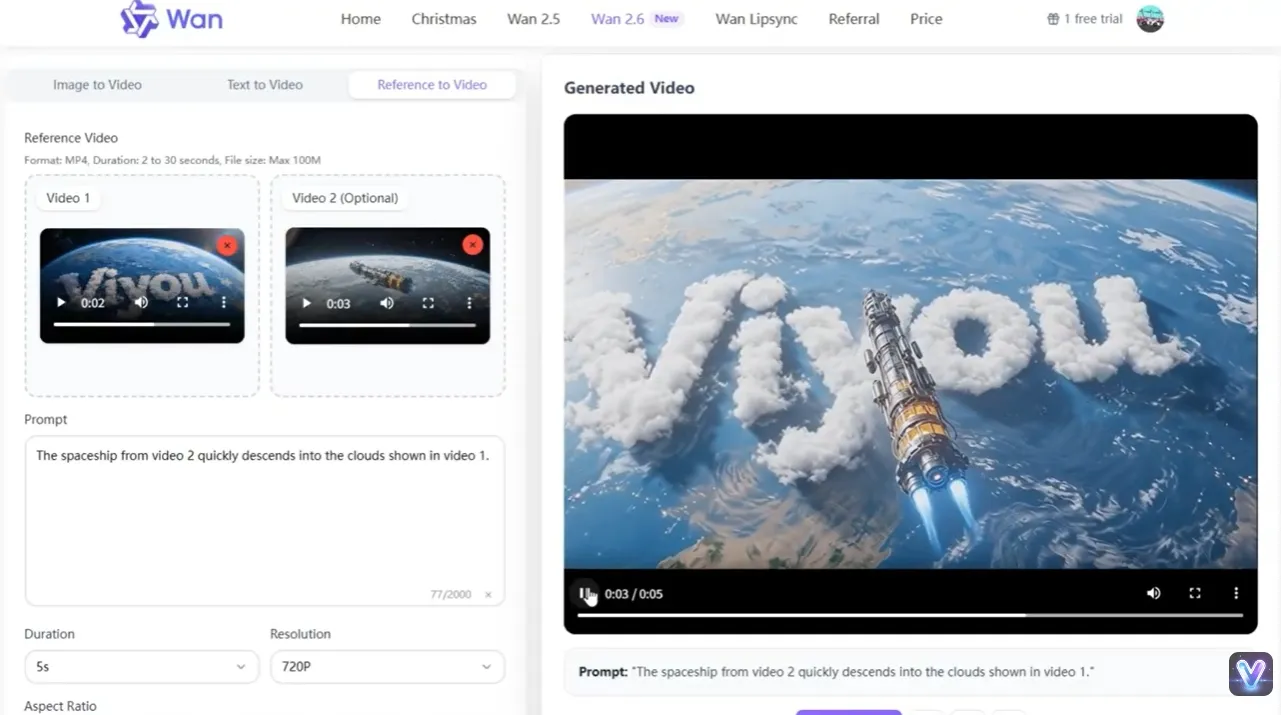
“A spaceship landing on Viyou clouds on the surface of the Earth.”
This prompt intentionally merges the motion logic of the spaceship video with the environmental elements of the cloud video — a perfect stress test for wan2.6 video to video.
Generation Results: From Reference to New Video
Wan 2.6 processed the input smoothly, with no additional parameter tuning required. The final output demonstrated several notable strengths.
Result 1: Motion Consistency
The spaceship’s descent path closely followed the original reference video. There were no visible jumps or temporal glitches — a clear advantage of Reference to Video over basic transformations.
Result 2: Environmental Fusion
The generated video successfully placed the spaceship onto the Viyou clouds, blending atmosphere, lighting, and depth in a visually coherent way.
Result 3: Frame Stability
Across the entire clip, object proportions remained stable. This is where Wan 2.6 clearly outperformed many other wan2.6 ai video generator competitors.
What Makes Wan 2.6 Video‑to‑Video Stand Out
Based on this hands‑on test, several strengths became clear:
- True structural understanding via wan2.6 reference video
- Minimal flickering or motion artifacts
- Strong alignment between prompt intent and visual output
- Usable results even with wan2.6 free attempts
This positions Wan 2.6 as more than a creative toy — it’s a practical production tool.
Who Should Use Wan 2.6 Reference to Video?
From a Viyou AI editor’s perspective, wan2.6 video to video is especially valuable for:
- IP fan creators and storytellers
- Sci‑fi and cinematic concept artists
- Marketing teams reusing existing footage
- Creators exploring wan2.6 free ai video workflows before scaling
Final Verdict After Three Free Generations
After fully using the free Wan 2.6 generations, my conclusion is clear:
Wan 2.6 delivers one of the most stable and controllable Reference to Video experiences currently available. For users searching for a wan2.6 free, high‑quality wan2.6 ai video generator, this is a tool worth serious attention.
FAQ: Wan 2.6 Reference to Video
Is Wan 2.6 free to use?
Yes. Wan 2.6 provides limited wan2.6 free usage, allowing users to test core features such as wan2.6 video to video before upgrading.
What is Wan 2.6 Reference to Video?
Wan2.6 reference video is a generation method where the AI uses an uploaded video as a motion and structure reference to create a new video with different visual elements.
Is Wan 2.6 a full AI video generator?
Yes. Wan 2.6 functions as a complete wan2.6 ai video generator, supporting text‑to‑video, image‑to‑video, and video‑to‑video workflows.
Can Wan 2.6 be used for commercial projects?
Commercial usage depends on the specific plan and licensing terms. Users should review official documentation before deploying generated videos commercially.