AI Video Generator
 AI Image to Video
 AI Text to Video
 AI Image Generator
 AI Image to Image
 AI Text to Image
 AI Video Generator
 AI Image Effects

 Bring your imagination to life with powerful Viyou AI tools.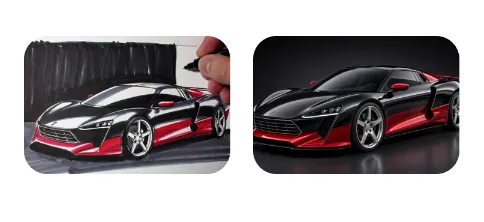
If "Image-to-Video" is about bringing a single photo to life, then "Two-Image-to-Video" (First and Last Frame Control) gives you the true perspective of an AI director. By specifying the "first frame (starting point)" and the "last frame (ending point)," you completely master the video's narrative arc. Whether it is the sweeping passage of time or a visually explosive transformation, two images lock down the AI's creative boundaries, producing a logically rigorous and breathtakingly dynamic scene.
Let's break down 8 of the most viral "first and last frame" practical scenarios, complete with ready-to-use Prompts.
🌟 8 Advanced Creative Scenarios & Practical Prompts
1. Season & Time Lapse
Showcase extreme changes in the same scene across different times or seasons, perfect for epic landscapes or architectural displays.
- First Frame: A vibrant spring forest photo.
- Last Frame: The exact same perspective of the forest covered in winter snow.
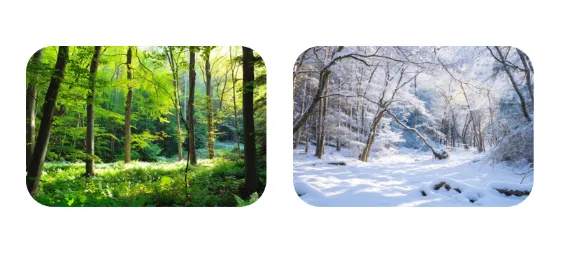
- Practical Tip: The perspectives and compositions of the first and last images must highly align. This allows the AI to focus all its computing power on "environmental changes" rather than struggling with complex camera movements that could break the generated footage.
2. Magical Concept Sketch Rendering (Sketch to Render)
An excellent way for designers to showcase creativity, letting clients watch a line drawing organically grow materials, shadows, and lighting.
- First Frame: A marker sketch of a sports car.
- Last Frame: A highly textured 3D render of the sports car from the exact same angle.
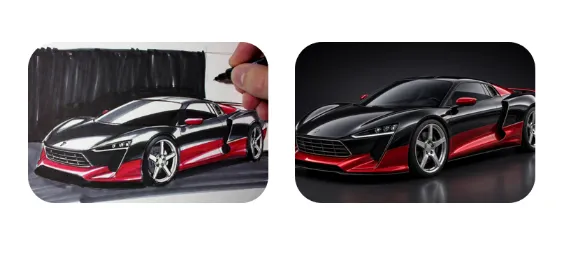
3. Surreal Visual Transformation (Surreal Morphing)
Leverage the AI's powerful imagination to seamlessly blend two seemingly unrelated objects into a surreal sequence.
- First Frame: A burning vintage clock.
- Last Frame: A giant, blooming red rose.
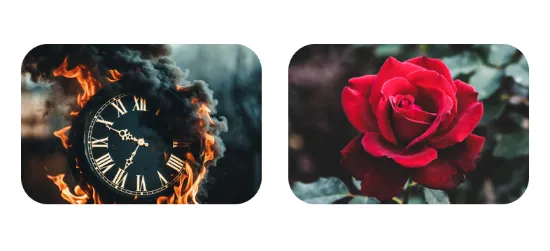
- Practical Tip: The first and last images should ideally share some similarities in color tone or general outline (like the warm fireglow and the red rose). This makes the transition process look incredibly silky and natural.
4. The Span of a Lifetime (Aging Process)
Tell the story of a lifetime in just a few seconds of video, delivering immense emotional impact.
- First Frame: A front-facing portrait of a young girl.
- Last Frame: A portrait of the same person (or someone with similar features) in their old age.
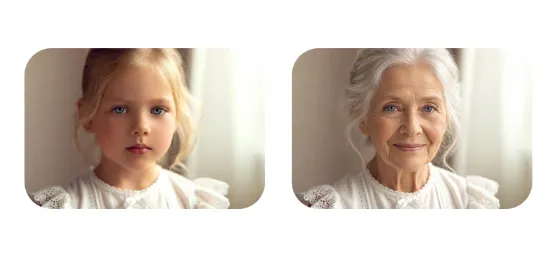
- Practical Tip: Keep the facial proportions and orientation consistent. Ensure the background is as clean as possible to prevent background elements from intertwining with the subject and causing facial distortions.
5. Seamless Day to Night Switch (Day to Night Transition)
Showcase the different aesthetic charms of urban bustle or natural landscapes as daylight fades into darkness.
- First Frame: A bright, sunny modern city street view.
- Last Frame: The exact same street, transformed into a cyberpunk neon night scene.
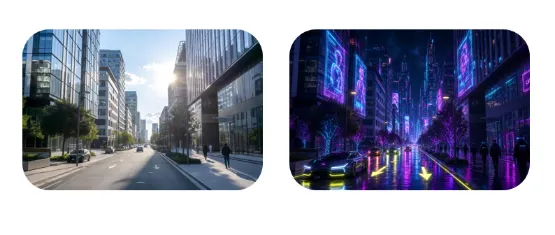
- Practical Tip: Emphasize the change in light sources in your prompt (e.g., streetlights turning on). This prompts the AI to generate breathtaking dusk transition frames during the morph.
6. Ruin Restoration and Time Reversal (Ruin Restoration)
"Rewind" historical ruins or abandoned buildings back to their most glorious, pristine moments.
- First Frame: A moss-covered ancient castle ruin.
- Last Frame: A magnificent, intact medieval castle.
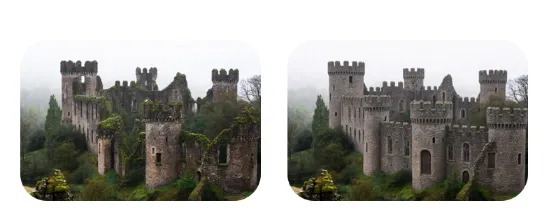
- Practical Tip: Use specific action phrases like rebuilding itself or time reversal to give the dynamic effect a magical sense of shattered pieces reassembling.
7. Cross-Dimensional & Material Transformation (Material Transformation)
Transform real-world people or objects into sculptures, claymation, or 2D anime styles seamlessly.
- First Frame: A real photograph of a woman's side profile.
- Last Frame: A white marble statue in the exact same pose.
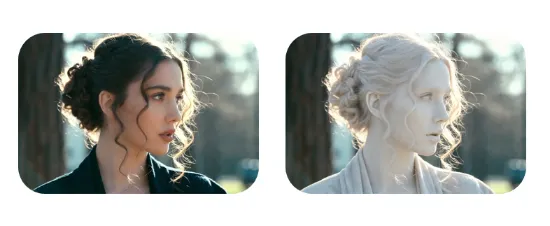
- Practical Tip: Describe the physical spreading process of the material (e.g., petrification process). This gives the video a clear visual progression across the surface rather than a stiff, simple crossfade.
8. Macro Time Lapse of Life (Plant Growth Time Lapse)
Display the intricate process of a seed sprouting into a blooming flower, bursting with the vitality of nature.
- First Frame: A tiny green shoot just emerging from the soil.
- Last Frame: A beautifully blooming sunflower.
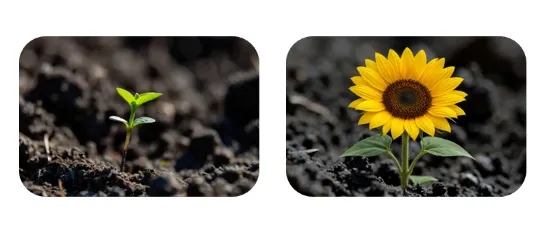
- Practical Tip: Morphing from a macro perspective heavily tests the AI's detail processing. The prompt must include specific growth actions (like unfolding or elongating) to guide the logical connection between the shifting frames.
🛠️ Beginner Pitfall Guide
To ensure these two images generate a perfect video transition, you must guarantee that the dimensions and aspect ratios of the first and last images are absolutely identical (e.g., both 16:9). If they differ, the resulting video will suffer from severe stretching or black bars.
While single-image generation focuses on "describing the static picture," two-image generation must focus on "describing the action and transition process." Use dynamic vocabulary heavily. If the visual gap between the two images is too wide and completely disconnected, the AI will often lazily apply a basic "crossfade" rather than a true physical morph. Therefore, retaining certain visual anchors—whether in outline, color, or composition—is the ultimate secret to generating flawlessly smooth transitions.
Having mastered first and last frame control, you have officially upgraded from an "AI gacha player" to an "AI Video Director." Go pick two related images and experience this frame-by-frame visual magic for yourself. Which transition scenario will you try first?